
Delivering a Power over Ethernet (PoE) video doorbell project will be made easier by treating power and network design as one project. Although data and power travel down the single Ethernet run, it still must be verified against the precise input of the end-point device, the switch capacity, the cable run, call volume and a recovery plan. To the integrator or distributor, the question of whether a system supports PoE is less important than whether or not all of the specified endpoints will function correctly on said network, in said building.
Uniwin-Global is developing SIP video intercom terminals as well as solution components for projects. In a villa intercom setup an indoor terminal can connect up to 8 video doorbells or common IPC cameras. One doorbell can then call multiple indoor terminals. In this villa configuration, the video doorbell and indoor terminal support PoE power supply. These are system related features, electrical values for a specific device as well as number of videos to be displayed at the same time for a specific configuration need to be verified against the respective hardware.
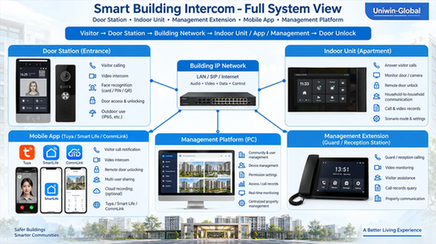
Start with a Project-Level Requirements Sheet
To choose the right PoE switch, make a list of all endpoints that need to be powered. Describe the function of each endpoint. For example, list door bells, indoor monitors, cameras etc. separately. While the number of connections is a good starting point to choose the right switch for the number of ports, the amount of power and the amount of bandwidth needed for the endpoints, for their different modes of operation and different call patterns, is completely different.
|
Planning item |
Confirm before design |
|---|---|
|
Endpoint inventory |
Device model, hardware revision, quantity and location |
|
Power input |
PoE standard or method, class, maximum power consumption and startup behavior. |
|
Network path |
Cable route, patch panels, intermediate switches and uplink path. |
|
Video use |
Call destinations, concurrent calls, preview channels and recording path. |
|
Resilience |
UPS coverage, restart behavior and local fallback procedure |
It’s a good idea to tie this document to the Bill of Materials and Floor Plan. If your design goes from one doorbell per home to multiple entrances or even indoor stations, update the port schedule and traffic assumptions accordingly. A quote lists sufficient switch ports for example, but the installed network then runs out of power or is over-cabled on the uplink.
Verify Power at the Device and Switch
The term PoE covers a wide range of different end points with different power requirements and different negotiation methods. It is necessary to ask the supplier for the exact supported PoE standard or power method for each hardware revision, the maximum input power, and whether start up or additional accessories create short peaks above normal operation. The fact that other equipment from the same supplier uses different shaped connectors, is part of a product family or is listed elsewhere in the same catalogue does not necessarily mean that it is compatible. Where an end point also has local power input, ask whether it can be powered from both sources or whether they are mutually exclusive.
Next, check two switch limits. First, does each endpoint get the power it needs? Second, does the total PoE budget of a switch be sufficient to cover the aggregate power consumption of all ports that are actively connected? For planning, use the maximum power draw as stated by the endpoint manufacturer. If there is no documented operating profile then allow suitable headroom for planned growth and startup conditions. When sizing the UPS or upstream power supply, account separately for the switch’s own power consumption. Just summing the maximum power per port as advertised by manufacturers for different ports does not necessarily mean that all ports can deliver this much power at the same time.
A practical schedule should include information such as device model, required power, switch model, port number and budget allocation for each port. If a switch has several power supplies or a shared budget for several ports, this has to be clearly allocated in the schedule as well. It will make commissioning easier to check and allow a future service team to easily look up information for added, moved or replaced devices.
Draw the Ethernet Route Before Installation
Trace the cable from the end point back to the PoE source. List all of the patch panels, wall outlets, couplers, etc. that the cable goes through. A short line on a floor plan may go through many risers or equipment rooms. Each extra connection is something that you will need to label and test. Also, record the intended switch and port for each end point instead of trying to determine the port that the cable will connect to when you are actually installing the cable.
Use the cable category, maximum channel length and environmental rating required by the device and applicable Ethernet installation standards. Confirm those details against the actual route, including any outdoor or unconditioned section. Long or poorly terminated runs can affect both data quality and delivered power. A link that comes up during a brief bench test may still fail when a device starts, a call is active or the cable is routed through its final connectors.
For new work, specify cable labels at both ends and require a cable test report that identifies each run. For an existing building, test the installed path before promising reuse. Check the cable, terminations, patch cords and intermediate hardware together. Do not assume a legacy cable is suitable because another network device currently works on it; the endpoint’s power needs and the route’s condition may be different.
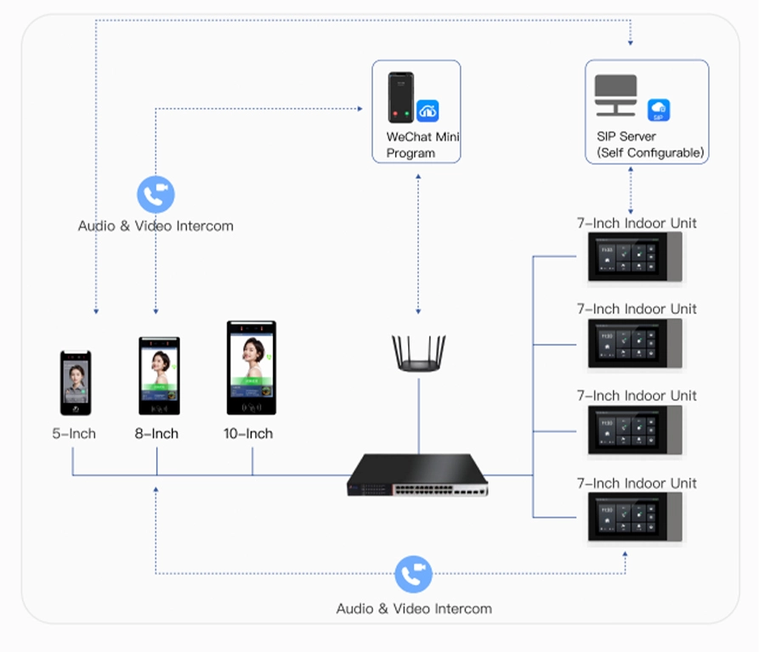
Estimate Video Traffic from the Call Workflow
Determining bandwidth usage for a system begins with the analysis of users, such as residents and staff, and their anticipated usage of the system. How will a particular doorbell communicate with certain indoor units? Will calls be received via an application or a management platform? How many people will be attempting to answer calls at one time? Can live previews be opened outside of an active call? The anticipated video resolution, frame rate, codec and stream rate for the chosen operating profile must also be established. Without this information a generic bandwidth figure could be misleading.
Note that the number of connected cameras does not necessarily equal the number of full-rate streams that can be displayed and recorded. While the villa intercom solution enables connection of up to 8 video doorbells or standard IPC cameras to an indoor unit, it is necessary to verify which camera combinations are supported in the proposed configuration, including calls with several indoor units and multi-channel preview. This also applies to uplink and storage size.
You need to factor in all the traffic from all the other calls, preview sessions, as well as any recording or cloud upload traffic that travels down the same uplink as the video from the endpoints. Don’t just test the ports on the access switches, also test the uplink to the core network. If several switches are forwarding together on one uplink, the total uplink traffic may approach the combined traffic from the cameras and increase further when other calls, previews, recordings, protocol overhead and network traffic are included. Test all the devices in the path, including any routers, firewalls or VPNs, and verify the required ports and services with your system provider.
Separate Intercom Traffic from General Network Use
For managed installations, ask the IT owner if the intercom endpoints should be put on a dedicated VLAN or otherwise segmented. Make sure that the VLANs, access lists, etc. match the rest of the network and the intercom system’s requirements to ensure basic reachability. Keep a record of where the addressing has been assigned, what services the endpoints need to talk to and who will be responsible for maintaining these rules after handover.
Ringing doorbells should not be put on isolated networks without thoroughly testing the entire call path. The end-point may need to contact an indoor station, local management platform or app service – or a combination of these. Verify name resolution, time synchronization as well as firewall settings where applicable. Restrict administrative access and change default passwords for the approved installation.
Plan for Power Loss and Recovery
Determine which network components must be operating during a power failure. For example, if users are making calls then will the PoE switch, router, core switch, local server etc. be running from the backup power supply? Determine the UPS capacity from the documented load and required runtime for the application at the particular site. Note that there is no single runtime that fits all sites. Also remember to include battery replacement in the maintenance plan as well as safe shutdown or restart.
Restarting of a switch or endpoint should be executed in a controlled manner. Verification of power-up, reconnection to all relevant network services as well as reversion to the original call setup should be executed. For sites with a local guard desk or reception, it is recommended to document the local fallback procedure for the network/services as well as the app in case they are not available. The building operator shall be made aware which functions are executed locally and which rely on external connectivity.
Run a Representative Pilot Before Rollout
Use at least one representative route and endpoint combination for a pilot. Include the longest or most complex cable path planned, the intended switch and port, and the same indoor unit and call destinations used in the final deployment. A pilot on a short patch cable at a workbench can confirm basic operation, but it does not validate the installed route, uplink or building network policy.
Test more than a successful call. Check two-way audio and video, calls to each planned destination, remote door opening where included in the design, preview behavior and recovery after a restart. Repeat with the expected concurrent activity and confirm that the switch reports stable power delivery. Keep test results with the final port schedule so later troubleshooting has a known-good baseline.
Questions to Put in the Supplier RFQ
A useful RFQ translates your assumptions into written answers. Thus, you need to specify the exact hardware revision as well as the supported PoE standard or power method. You should also determine the maximum as well as startup power consumption, the limits for cables and distances, and whether a separate power source is needed in certain situations. In addition, you need to find out about the supported video profiles, the expected stream rates, the behavior for concurrent calls or previews, and the network services that are needed for local as well as remote calls.
Ask about system level aspects, such as how many endpoints are going to be connected, which combinations of endpoints can call or be on hold at the same time, and what happens with a switch or even a complete network failure. Which switch features are required, which are optional, and what kind of test evidence the supplier can provide during a pilot has to be clarified. It is a good idea to have the integrator and the IT owner read the answers together. A technically compatible product does not necessarily have to be a good solution if the call workflow and the cabling as well as the support handover have not been clarified satisfactorily.
Choose Devices by Their Confirmed Role
Electrical specifications should be confirmed for the exact hardware revision before purchase. For the selected doorbell and WI704 indoor monitor, ask the seller to confirm in writing the PoE specifications for the exact hardware version they are quoting.
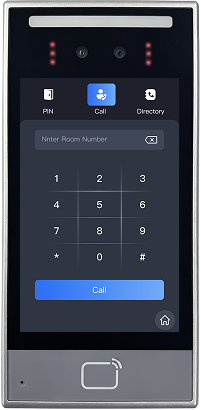
Uniwin-Global’s SIP intercom system supports project teams working on building intercom installations. Uniwin-Global’s SIP intercom solution supports PoE for villa doorbell and indoor unit. Please note that models’ power supply, video configuration and network limit etc. need to be checked in advance before purchasing. Please send the list of end points, floor plan and call flow etc. of the project and we will discuss it in detail with you as per your project requirements.
Conclusion
Start reliable PoE video doorbell deployments by verifying your device data and creating the best possible path from a end point to power to services. For the switches verify per-port as well as the total capacity. Verify the cable installed. Estimate the traffic based on realistic call scenarios. Test the recovery. Repeat for the whole site. A short set of requirements and a pilot for that requirements set will give your team enough evidence to make a install predictable and supportable.
FAQ
Q: Does every SIP video doorbell support PoE?
A: No. Find out the standard or power method of the exact model and revision of the hardware as well as the required power. System-level PoE capability of a product does not necessarily mean that all products of a product family support it.
Q: Does support for eight cameras mean all eight can stream at once?
No, a villa configuration can support up to 8 video door bells or standard IPC cameras connected to an indoor unit. However connection count does not equal simultaneous display/ recording/ calls etc. Check supported combinations for your chosen configuration.
Q: Can an existing Ethernet cable be reused for PoE?
A: It may be adequate but verify the full installed route and compare against the category, length, end and condition of the endpoint against relevant installation requirements. Link lights and operation of other devices over the same cabling are not acceptable verification methods.
Q: What should we provide for a PoE intercom quotation?
A: Share the endpoint models and quantities along with the floor plan or cable schedule. Be sure to list out the expected call destinations along with any preview or recording requirements. Also, share the proposed network environment and have the supplier write out the model-level power, video and network requirements.